MiniTool Partition Wizard 8.1.1
- Convert NTFS to FAT.
- GPT Disk and MBR Disk interconversion.
- Copy Dynamic disk volume.
- Copy UEFI boot disk.
- Convert GPT-style Dynamic Disk to Basic.
- Move Boot/System volume for Dynamic Disk.
MiniTool Partition Wizard Bootable CD
MiniTool Partition Wizard Bootable CD allows user to boot computer directly into MiniTool Partition Wizard to manage partitions without any limitations. Features including Rebuild MBR, Extend partition, Split partition, Partition Recovery, Move/Resize Partition, Copy Partition, Merge Partition, Change Cluster Size, Create Partition, Delete Partition, Format Partition, Convert File System, Hide/Unhide Partition, Explore Partition and much more.
Functions of MiniTool Partition Wizard Bootable CD
MiniTool Partition Wizard Bootable CD has the same features as of MiniTool Partition Wizard Home/Business Edition. Features include: Convert NTFS to FAT, GPT Disk and MBR Disk interconversion, Change Font, Copy UEFI boot disk, Convert GPT-style Dynamic Disk to Basic, Move Boot/System volume for Dynamic Disk, Move/Resize Partition, Extend partition, Split partition, Copy Partition, Create Partition, Delete Partition, Format Partition, Convert File System, Hide/Unhide Partition, Explore Partition, Partition Recovery, Convert Dynamic Disk to Basic Disk, Rebuild MBR and much more.
System requirement
MiniTool Partition Wizard Bootable CD support 32/64 bit Windows XP, Vista and Windows 7 but do not support Windows Server Operating System. Upgrade to MiniTool Partition Wizard Bootable CD Server Edition if you are using Windows Server 2000/2003/2008.
How to get MiniTool Partition Wizard Bootable CD
Download MiniTool Partition Wizard Bootable CD iso file absolutely FREE from http://www.partitionwizard.com/download.html. Burn ISO file onto a CD using any CD/DVD Burner software.
Why MiniTool Partition Wizard Bootable CD
* Manage partition without installing anything on your computer
* Manage partition without Operating System
* Restore partition if partition table is damaged causing computer to not boot
* Restore partition if partition is deleted by accident causing computer to not boot
* Rebuild MBR if MBR is damaged
* Analyze partition mapping without having to boot computer
What to expect from this bootable CD
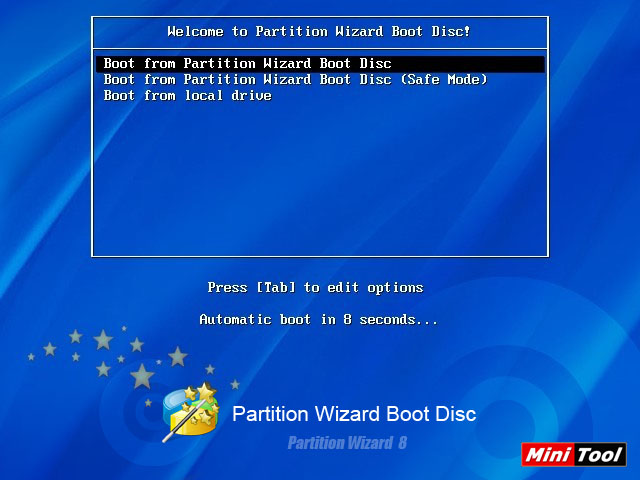
Step 1: Choose boot disk
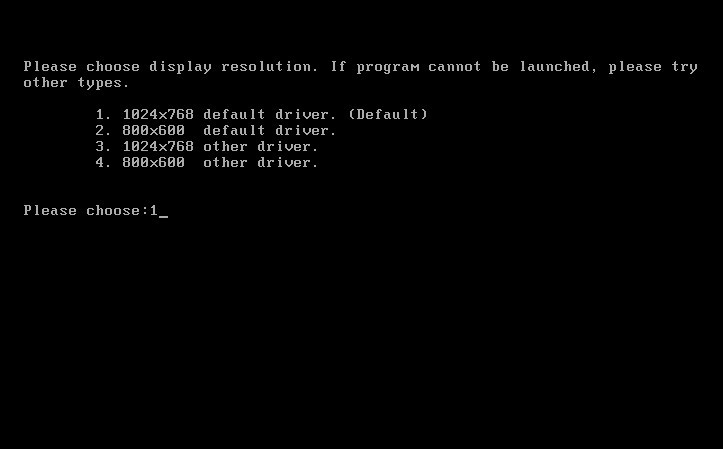
Step 2: Choose screen resolution
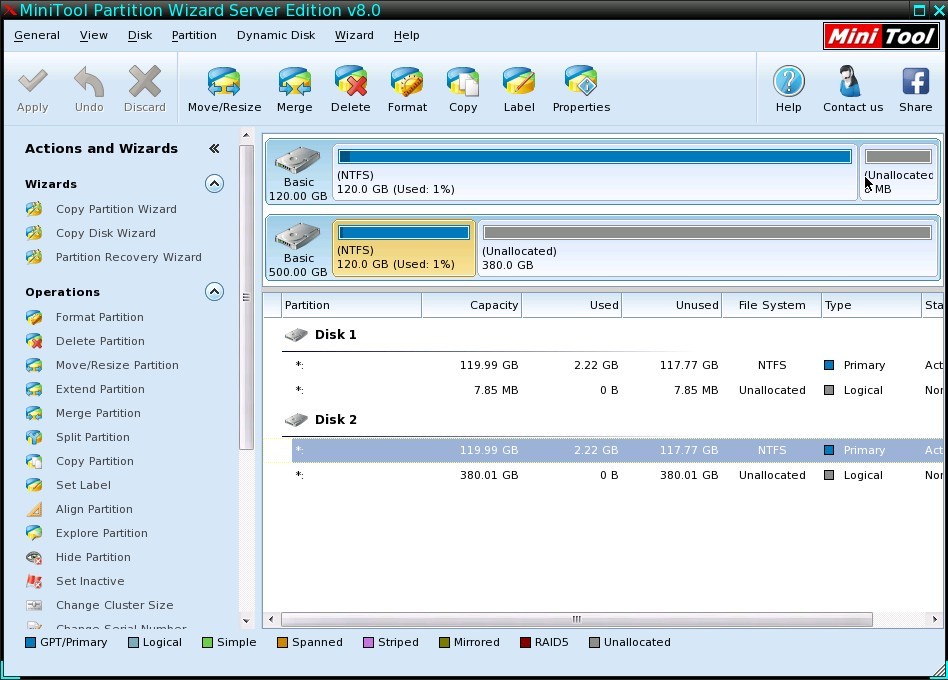
Step 3: Manage your partition
Free Easy CD/DVD Burner
http://www.nch.com.au/burn/index.html
Partition Wizard Server Edition 8.1.1 (5% off)
MiniTool Partition Wizard Server Edition 8 is a professional server partition resizing software. While referring to server partition resizing tool, MiniTool Partition Wizard Server Edition is highly recommended.
Server Partition Resize Resources
System Partition Resize
- windows server partition resize
- windows server resize boot partition
- windows 2000 server partition resize
- windows 2003 resize partition
- windows 2003 server partition resize
- windows server partition resize
- windows server resize system partition
- windows server 2003 partition resize
- windows server 2003 resize
- windows server 2008 partition resize
- windows server 2008 resize
- windows server partition utility resize
- windows server resize
Partition resizer for windows server
- resize a server partition
- resize disk partition server
- resize partition in server
- resize partition ntfs
- resize partition on server
- resize partition on server 2003
- resize partition on windows server
- resize partition server 2003
- resize partition windows 2003
- resize partition windows server
- resize partition windows server 2003


- Home
- |
- Buy Now
- |
- Download
- |
- Support
- |
- Contact us
Copyright (C) 2009 - 2014 www.server-partition-resize.com, All Rights Reserved.